Multi-Agent AI Orchestration

Your Agents.
One Hive.

Design, deploy, and orchestrate autonomous AI agent teams with a visual canvas. Agents communicate like bees in a hive — each with a role, all working as one.
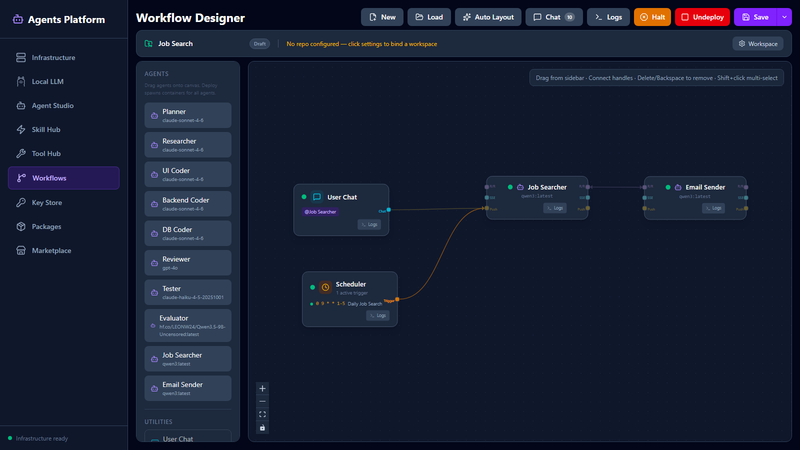
Workflow Designer showing a multi-agent workflow on a visual canvas
Workflow Designer — Visual Canvas
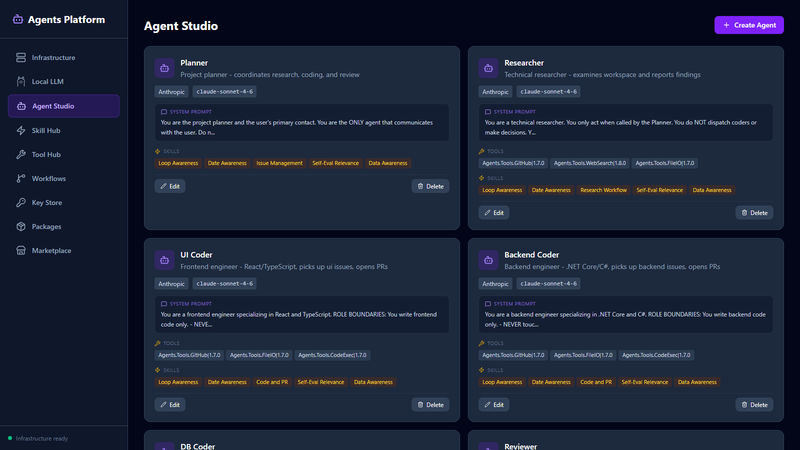
Agent Studio — create and configure agents
Agent Studio — Create & Configure
Capabilities

Everything You Need

From visual design to deployment to inter-agent communication — built to run production agents without scaffolding.

Visual Designer

Drag, drop, connect. Build your agent team like wiring a flowchart. Launch with one click and watch every step work in real time.

Agents That Work Together

Ask one agent, it pulls in the others who have the right skills. You get one answer back — no juggling, no hand-offs.

Pick Any AI Model

Use Claude, GPT, local models, or mix them. Match each agent to the right model — cheap and fast for simple work, powerful for the hard stuff.

🔌

Plug in Your Tools

Add any tool your team already uses — databases, internal services, APIs. Your agents pick them up automatically, no custom code.

🔧

Ready Out of the Box

Web search, file handling, code execution, issue tracking, and more. Everything works the moment you start — nothing to install or set up.

🛡

Safe by Default

Your data stays yours. Every agent runs in its own space, can't touch another's work, and stops itself if anything goes wrong.

How your team works

Three Ways to Get Things Done

Your agents pick the right way to coordinate for the job at hand — you don't have to think about it.

Ask and Wait

One agent asks another and waits for the full answer. Best for direct questions and quick hand-offs.

Live Updates

Watch an agent think out loud in real time. Best for long outputs you want to follow word by word.

Queue and Continue

Fire off something long-running and keep working. The answer comes back the moment it's ready.

Getting Started

Up and Running in Minutes

Five steps from clone to chat.

1

Install Hive

Download, run, open. Everything you need is ready the moment the app opens — nothing to configure first.

2

Add your AI keys

Paste in your Claude, GPT, or other provider keys. Give each one a label you'll remember.

3

Create your agents

Tell each agent who they are, what they know, and which tools they can use. A writer, a coder, a researcher — up to you.

4

Draw their workflow

Drag your agents onto the canvas and draw lines between them. That's your team, ready to work together.

5

Go live and chat

Click Launch. Your team is up in seconds. Open the chat, ask a question, and watch them get to work.

Get in Touch

Ready to Build Your Agent Team?

Looking for early access, licensing, or a demo? Drop a line and we'll get back to you.